Problem:-
Most of the time we require data in which we require first value and last value from different group of rows. Now how easy we can get result this is one of the challenge for us.
Solution:-
Lets understand this by an example. Suppose you have a sales table in which you maintain daily sales. Now your want a result sent in which you know what is first sale of the day and what is last sale of the day.
SQL SERVER 2012 provides you facility to achieve this task easily with First_Value & Last_Value function.
The syntax of first_value & Last value is exactly same as Row_Number, Dense_Rank & Rank_function.
See below example in which I have used Adventureworks SalesOrderHeader table.
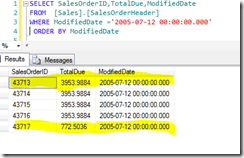
Now if you see below snap I took a random date 2005-07-12 and fetched record and highlighted is first row & Last Row.
So on date 2005-07-2012 Sales order have 3953.9884 as a frist value and 772.5036 as a second value.
Now above specific result we can achieve by first_Value & Last_Value function of SQL SERVER 2012 as shown below

so, In this way you can achieve the first_Value & last_Value from a group of rows
I hope this may help you somewhere.
Enjoy !!!
RJ


